Booking through WhatsApp: where a salon loses clients and how to fix it
In short
- In a chat the client waits for an answer — and often books wherever replied first.
- The main leaks: a reply an hour later, messages at night and on days off, a slot offered in chat that was already taken by phone, and agreements that never reached the schedule.
- A working setup: answer “any time?” with a booking link, keep questions and consultations in the chat.
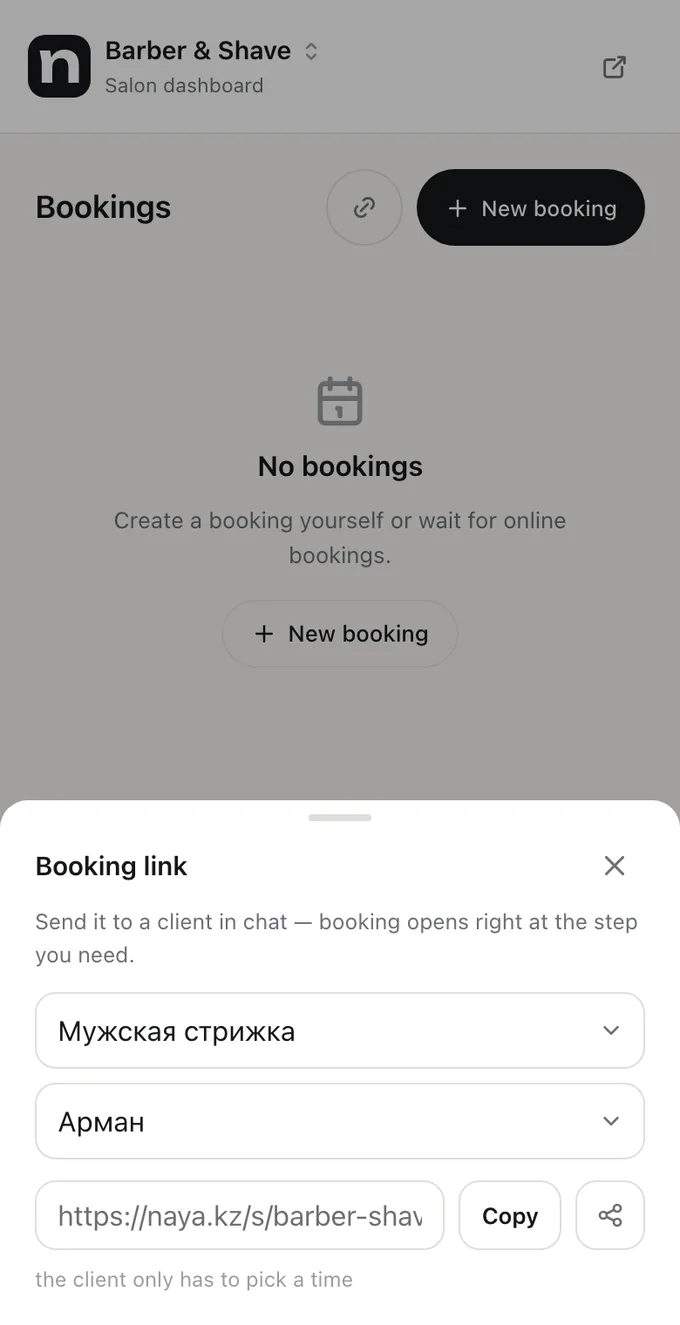
- A link straight to the right service and specialist leaves the client one step — picking a time.
In Kazakhstan WhatsApp is the main way people book a salon. It suits the client and reception is used to it — while messages are few. But booking by chat loses clients quietly: nobody sees the person who wrote, didn’t get an answer and booked somewhere else.
What booking by chat looks like
A typical thread: “Hi, any time for a manicure on Saturday?” Reception opens the schedule, sees two slots, replies. The client comes back forty minutes later: “And after five?” — the schedule again. While they were chatting, one of the slots went to a phone booking. Five messages and half an hour for one booking, and on a Saturday there are dozens of these threads.
Where a salon loses clients on WhatsApp
- Slow replies. Clients often write to several places at once and book wherever replied first. A reply an hour later isn’t “a bit late” — usually it’s someone else’s client.
- Nights and days off. A message sent at 11 pm is read in the morning — after the person has booked elsewhere or changed their mind.
- Out of sync with the schedule. The chat offered a time that was taken by phone or by another receptionist that same minute. Hence double bookings and awkward apologies.
- The booking never reached the schedule. Agreed in the chat but not written down — the client arrives and the specialist is busy.
- A lost thread. The conversation slid down under new messages and nobody ever answered.
None of these losses shows up in a report: the schedule simply lacks a booking that could have been there.
What to keep in the chat and what to hand over to online booking
| Client’s question | Best place to answer |
|---|---|
| “Any time on Saturday?” | With a booking link — the client sees every slot |
| “How much is it?” | With a booking link — the prices are there |
| “Would this colouring suit me?” | In the chat: that’s a consultation, a person gives it |
| “Can I bring my child? Where do I park?” | In the chat or in the page description |
| “I want to reschedule” | Via the link in the booking — within your cancellation rules |
| “I’m running ten minutes late” | In the chat |
How to answer “any time?”
Instead of a list of slots — a booking link. Better still, a link straight to the right service: the client won’t have to hunt for a manicure in a forty-line price list. If they want a particular specialist — a link with that specialist.
A ready reply worth saving as a quick reply: “Hi! Free times for a manicure are here — pick whatever suits you: [link]. Any questions — just write.”
Why your chats need a channel of their own
Booking through a personal WhatsApp has one more weakness: the conversation lives on one person’s phone. When the receptionist leaves, the threads leave too; on their day off, clients get their personal number or nobody. The history of what was agreed stays with them as well.
Where to start
- Look through a week of chats: how many messages are questions about free time and prices. Usually more than you think.
- Create a booking link and put it in your WhatsApp Business profile and greeting message.
- Save a quick reply with the link.
- Agree who answers everything else and how fast — say, no longer than fifteen minutes during working hours.
- A month later, compare how many bookings clients made themselves and how much time reception got back.
Frequently asked questions
Can I stop taking bookings through WhatsApp altogether?
You don’t have to, and not at once. Clients are used to writing in the messenger, and that’s fine. The goal isn’t to ban chats but to take the routine out of them: a link answers the standard question, a person answers the rest.
How do I make WhatsApp Business booking automatic?
WhatsApp Business has a greeting message and quick replies. Put your online booking link in them — then a client writing at night books straight away instead of waiting for the morning.
What about clients who still write “book me in”?
Book them: reception enters the booking into the same schedule online booking uses. Over time many start using the link themselves — especially when that’s what they get in reply instead of a list of slots.
How do I avoid missing messages at weekends?
Let a link answer the standard question and agree on someone on duty for the rest. In Naya the notification goes to whoever is handling the conversation, and if they don’t have the app — to the admins and the owner.
All of this is already in Naya
Online booking, client reminders, client cards and a till — in one dashboard for a salon or a specialist.