Online booking for a beauty salon: where to start and what it gives you
In short
- Online booking is a page where clients pick the service, the specialist and a free slot from your real schedule themselves — no call, no chat.
- It gives you bookings around the clock, less messaging for reception and no double bookings for the same time.
- To launch you need a price list with durations, each specialist’s working hours, cancellation rules and a link where people find you: Instagram, 2GIS, WhatsApp.
- The phone and messenger stay: online booking takes the repetitive “any time on Saturday?”, while questions and consultations stay with people.
Most salon bookings still go like this: a client writes “any time on Saturday?”, reception checks a notebook or a spreadsheet and offers two options, the client replies an hour later — and one of the slots is already taken. Online booking breaks that loop: the client sees free time and books in a minute, even at eleven at night.
What online booking is
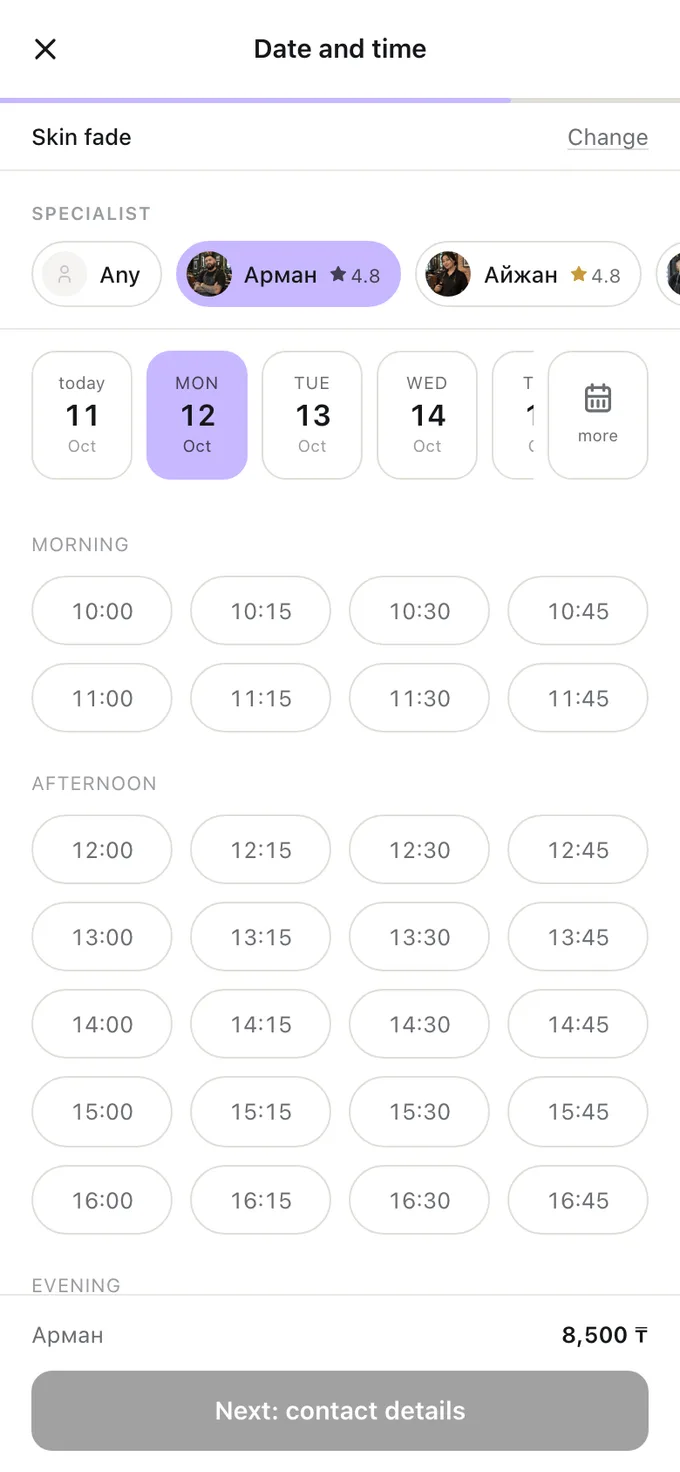
It is your booking page: the price list, the team and free time calculated from your real schedule. The client picks a service, a specialist or “anyone”, a day and a time, confirms their phone number — and the booking appears on your side straight away, while that time stops being free for anyone else.
The word “real” matters. The page doesn’t say “call us to check”; it shows exactly the slots that exist. If the specialist is busy, on holiday or the gap is shorter than the service, that time is not offered.
Why online booking beats booking by phone and WhatsApp
| Phone and WhatsApp | Online booking | |
|---|---|---|
| When clients can book | When reception is available | Around the clock |
| Time per booking | From a couple of minutes to hours of messaging | A minute for the client, zero for reception |
| Double bookings | Happen when people check different notebooks | Impossible: taken time is no longer offered |
| Cancelling | Call and explain | Via the link in the booking, within your rules |
| Reminder | If someone remembers to send it | Sent automatically |
That doesn’t mean you no longer need the messenger. “Will this suit me?” and “can I bring my child?” are still questions for people. Online booking takes something else — the repetitive questions about free time that eat up most of the hours. More in “Booking through WhatsApp: where a salon loses clients”.
What to prepare before launch
- A price list with durations. For every service — the price and how long it really takes, preparation included. The duration decides which slots the client sees: “gel manicure — 1 h 30 min”, not “manicure from 5,000”.
- Who does what. Which services each specialist performs. A client who chose colouring shouldn’t be offered someone who doesn’t do colouring.
- Each specialist’s hours. Working days, hours and breaks. Without a schedule the system doesn’t know when a person is in.
- Cancellation rules. Until when a client may cancel or reschedule on their own — usually a few hours or a day before.
- Confirmation. Bookings are confirmed straight away, or you confirm each by hand. Manual confirmation is a calmer start; switch to automatic once you’re used to it.
Where to put the booking link
Online booking only works if the link is visible where people decide to book:
- Your Instagram profile — the main way in for salons and specialists. How to set it up — in “A booking link on Instagram”.
- Your 2GIS and Google Maps listing — in the website or booking field.
- Your WhatsApp Business profile and greeting — someone writing at night can book straight away.
- Stories and pinned posts — a link to the specific service the post is about.
- Reception — a sign for people who want to book their next visit without waiting for staff.
Common launch mistakes
- Durations by eye. If a service takes two hours but the price list says an hour and a half, the schedule slips every day.
- A hidden link. The profile header shows a WhatsApp number, and the booking link sits in the third pinned post.
- Nobody checks new bookings. With manual confirmation someone has to do it quickly: a client who waits a day for an answer books next door.
- Schedules aren’t updated. The specialist is on holiday, yet the page still shows slots. Enter holidays and days off as soon as you know.
How to tell online booking is working
After a month, look at three things: how many bookings came in without reception, how many were made outside working hours, and how often clients cancel in advance instead of simply not showing up. The last one is a good sign: time freed in advance can be sold again. How to cut no-shows — in a separate article.
Frequently asked questions
How much does online booking for a salon cost?
Usually it’s a monthly subscription; some services charge per booking or per message. Compare not just the price but what’s included: client reminders, an app, the number of team members. Naya’s prices are on the main page.
Do I need a website to take online bookings?
No. The booking page is your booking website: it has its own address, opens on a phone and can go into Instagram, 2GIS or WhatsApp.
What if clients don’t want to book online?
Some will keep calling — that’s fine. Reception books them into the same schedule, so there are no double bookings.
Can clients book online for the next hour?
It depends on the service. In Naya online booking closes an hour before the start, so the specialist knows about the client in advance; for the nearest slots reception books the client.
All of this is already in Naya
Online booking, client reminders, client cards and a till — in one dashboard for a salon or a specialist.