Software for a self-employed specialist: bookings, clients and your own page
In short
- A specialist who works for themselves doesn’t need salon software but their own booking page, a schedule, client reminders and a client base with visit history.
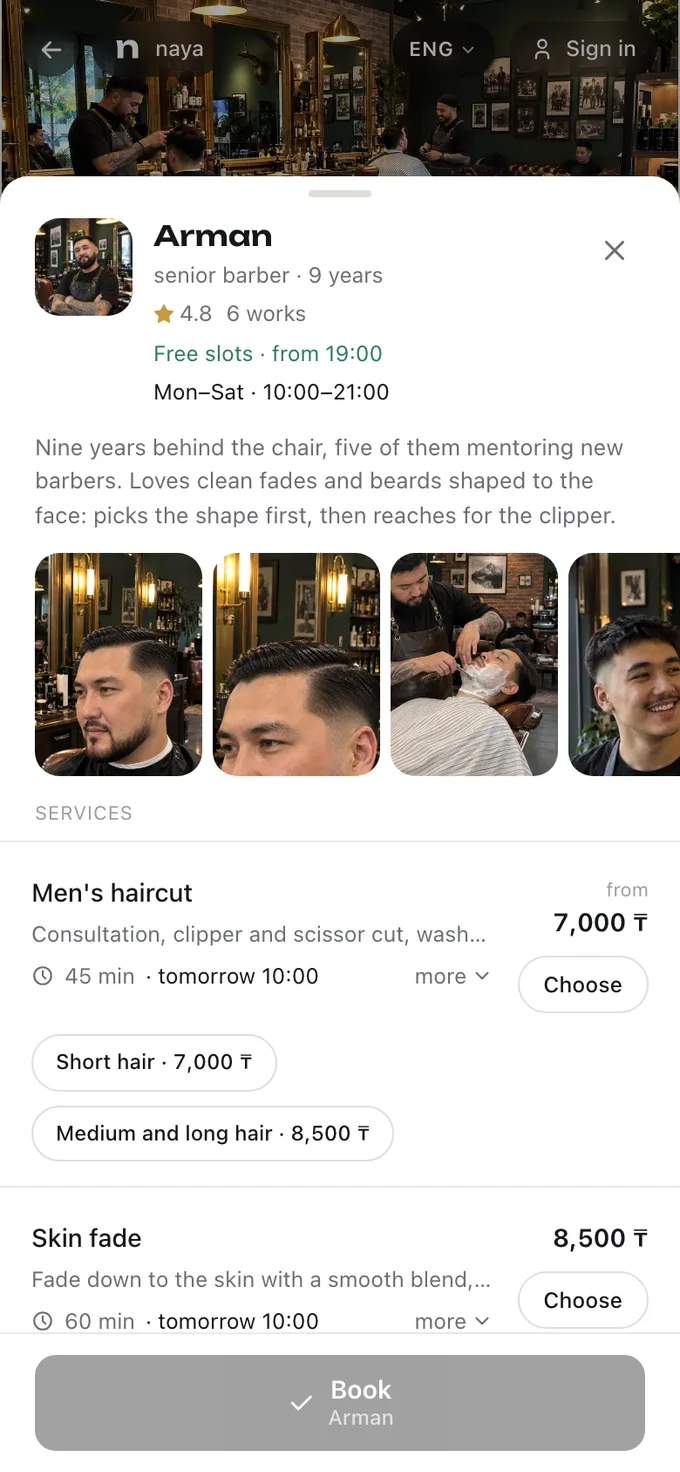
- A booking page is a link for Instagram and WhatsApp: the client picks the service and the time themselves, without messaging back and forth.
- If you work both in a salon and on your own, keep the hours apart: in the salon you’re booked by the salon’s schedule, with you — by yours.
- Your reviews and work should belong to you, not to the place: leave the salon and they leave with you.
A specialist who works for themselves is the specialist, the receptionist and the marketer all at once. While there are few clients, WhatsApp and notes on the phone are enough. Then come the double bookings, “I wrote to you on Wednesday” and clients who didn’t show up. Here’s what software a solo specialist needs and how it differs from salon software.
Why a self-employed specialist needs different software
Salon software is built around a team: several specialists, a receptionist, a till, commission-based pay. For one specialist that gets in the way — extra screens, and you pay for things you don’t use. One specialist needs something else:
- Your own booking page with a clear address — it goes into your Instagram profile and gets sent on WhatsApp.
- A schedule that’s easy to change: a day off, a holiday, “only until three on Saturday”.
- Client reminders, so you don’t have to message everyone by hand the day before.
- A client base with history: what was done last time, which colour, what they asked for.
- Work and reviews, which new clients use to choose you.
How to set up your booking page
- A price list with durations: not “manicure from 5,000” but “gel manicure — 1 h 30 min, 7,000 ₸”.
- Your work: a few of the best pieces, with the one you want to be known for first.
- A short bio: experience, what you’re best at, where you see clients.
- The address and how to find you — if clients come to you.
- The link in your Instagram profile header and your WhatsApp Business greeting. More in “A booking link on Instagram”.
How to combine working in a salon and on your own
Many specialists work in a salon part of the week and see their own clients the rest of it. The main thing here is not to sell the same time twice.
- Keep the hours apart: for example, Tuesday to Friday in the salon, Saturday and Monday on your own.
- Remember whose schedule it is: in the salon you’re booked by the salon’s schedule, with you — by yours. If the hours overlap, keeping track of it is up to you.
- Agree with the salon in advance whether you can invite its clients to come to you. It’s a question of trust, and it’s better discussed before rather than after.
Who owns the reviews and the work
Reviews are the main argument for a new client. But in many places they belong to the salon: you leave, and you start from zero. When choosing software, check that your reviews and work stay with you.
How to take tips without awkwardness
Clients often want to thank a specialist but don’t know how: they have no cash, and asking for a number feels awkward.
How much software for a specialist costs
Frequently asked questions
Which booking app should a nail technician choose?
One with your own booking page for Instagram, a flexible schedule, client reminders and a client base with visit history, where the reviews and work belong to you. Compare the price a year ahead and what it includes.
Can I take online bookings if I work from home?
Yes. A booking page doesn’t need a salon: you list your services, your schedule and, if clients come to you, the address. Whether to be in the naya.kz catalog is your call.
What happens to my reviews if I leave the salon?
It depends on the software. In Naya the reviews you got for your work in the salon stay on your profile.
How much does software for a specialist cost?
In Naya, 1,490 ₸ a month for the first three months, then 2,990 ₸.
All of this is already in Naya
Online booking, client reminders, client cards and a till — in one dashboard for a salon or a specialist.