An AI assistant for a salon owner: what to ask it and what to hand over
In short
- The AI assistant in the dashboard answers everyday questions about your salon: how many bookings there are tomorrow, who is available on Saturday, how the month went.
- You can hand it the routine: book a client, move a visit, change a price or your opening hours.
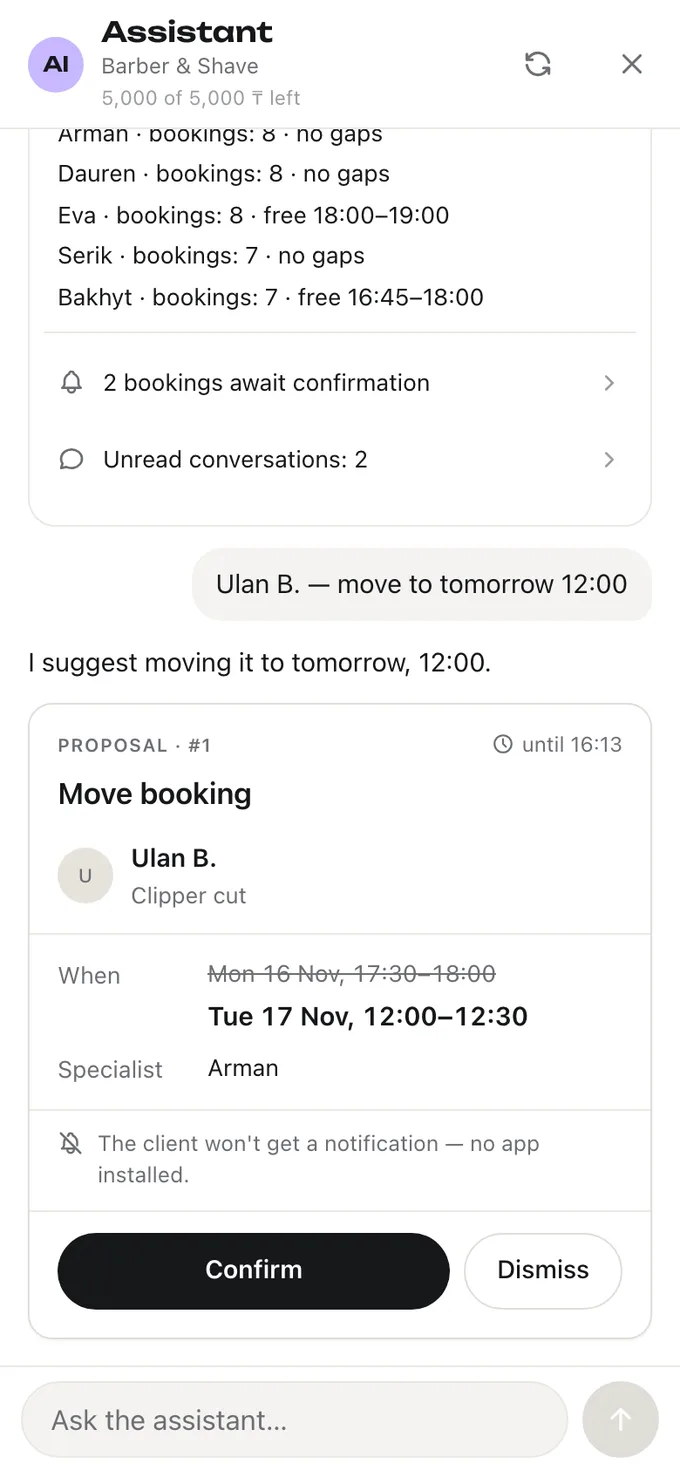
- It first shows any change as a “before → after” card and carries it out only after you tap «Confirm».
- It sees only your dashboard’s data, and only what your role can see: a specialist sees their own bookings, the owner sees the whole place.
To answer a simple question like “who’s available on Saturday afternoon?”, an owner opens the calendar, scrolls through the specialists and checks their schedules. The assistant in the dashboard does the same in seconds: you ask in words, it looks at your bookings, schedule and price list and answers. Here’s what you can ask it, what you can hand over and how it’s protected against mistakes.
What to ask the assistant
| Question | What it answers |
|---|---|
| “How many bookings are there tomorrow?” | The number of bookings and how the day starts |
| “Who is free on Saturday afternoon?” | The specialists and their available time |
| “How many bookings this month compared to last month?” | A comparison of the two months |
| “What does Aigul have this evening?” | The specialist’s bookings: time, service, client |
| “Why aren't we in the catalog?” | What the page is missing to appear in the catalog |
The answer is built from the dashboard’s data at the moment you ask, not from what the assistant “remembers”. That’s why it matches what you see on the screens.
What you can hand over to it
- Bookings: book a client for an appointment, into a class or as a course; move, confirm or cancel a booking; mark a visit or a no-show.
- Time: block time for a break or unblock it.
- Price list: add a service, change a price, duration or variants, translate names.
- Hours and schedules: change the place’s opening hours and the specialists’ schedules.
- The rest of the dashboard: the place’s profile, the team, passes and classes.
You can give tasks in bulk: “raise haircut prices by ten percent” — one card with every line, not ten questions in a row.
How the assistant is protected against mistakes
- A card first. The assistant shows any change as “before → after”: which booking, what time, what price. Until you tap «Confirm», nothing changes.
- Money needs a password. Actions involving money ask for your dashboard password.
- It sees what you see. A specialist is shown only their own bookings, an admin — what an admin can see.
- Phone numbers don’t leave. The assistant sees a client’s number as a label, not as digits.
- It doesn’t argue with the screen. If the booking was changed while the card was waiting, the assistant won’t carry it out using the old data.
How it differs from AI that answers clients
The assistant in the dashboard works for you: it answers you and carries out your tasks. It doesn’t write to clients itself. AI that handles messaging with clients instead of a receptionist is a different job with its own risks; more on that in the article “An AI receptionist for a salon: what it can do, where it gets things wrong and how to choose one”.
Where to find it and how much it costs
Frequently asked questions
Can the assistant mess up the schedule?
Not without your confirmation. It shows a card with what will change and carries it out only after «Confirm». If the booking was changed in the meantime, the card won’t go through on the old data.
Does the assistant see clients’ phone numbers?
No. In the conversation a client’s number is replaced with a label; the digits aren’t passed to the assistant.
Can specialists use the assistant?
Yes. Through the assistant a specialist sees the same as in the dashboard — their own bookings and their own schedule, without the place’s revenue.
How much does the assistant cost in Naya?
It’s included in the subscription. Each place has a monthly limit; if it runs out, the dashboard keeps working as usual, and the limit renews on the first of the month.
All of this is already in Naya
Online booking, client reminders, client cards and a till — in one dashboard for a salon or a specialist.